
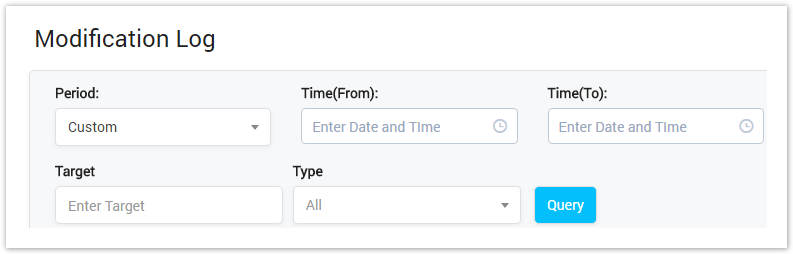
| Field Name | Description |
|---|---|
| Period | Select the period time when the modification event happened. It can be:
|
| Target | Query by the value after changing. |
| Type | Query by type of modification:
|
Modification Log Result Form
Filling in criteria then click on the Query button, the result form will be displayed as below:
Screenshot: Modification Log Result Form
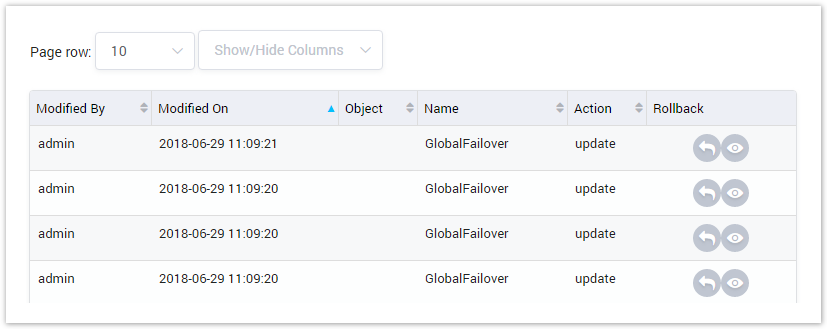
Field | Description |
|---|---|
| Time | The date/time when the modification happened. |
| Module | The module where the modification happened. |
| Operator | The user who do the modify record. |
| Target | The changed data. |
| Action | The type of action: modification or creation or deletion. |
| Rollback | Rollback data to initial. |
| Button | Description |
|---|---|
| Is used to rollback data to initial. |
| Is used to view the change. |
| Is used to set the total of records per a page. |
| Is used to select the column which will be shown/hidden. |
| Is used to go to next, previous page. It is also used to go to the specific page by clicking on the number of page. |




Related pages
Popular Topics
Recently Updated Pages
