
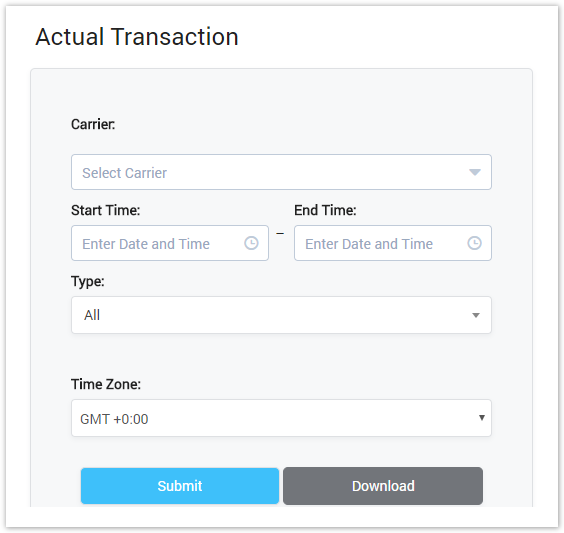
| Field Name | Description | ||||||||||||||||||||||||||||
|---|---|---|---|---|---|---|---|---|---|---|---|---|---|---|---|---|---|---|---|---|---|---|---|---|---|---|---|---|---|
| Carrier | Name of Carrier who transacting. | ||||||||||||||||||||||||||||
| Type | Type of Transaction.
| ||||||||||||||||||||||||||||
| Time Zone | Time Zone | ||||||||||||||||||||||||||||
| Period | Period time when the transaction happened. You have to select the start time and end time. |
Actual Transaction Result Form
Filling in all criterias then click on submit button, the result form will be displayed as below:
Screenshot: Actual Transaction Result Form
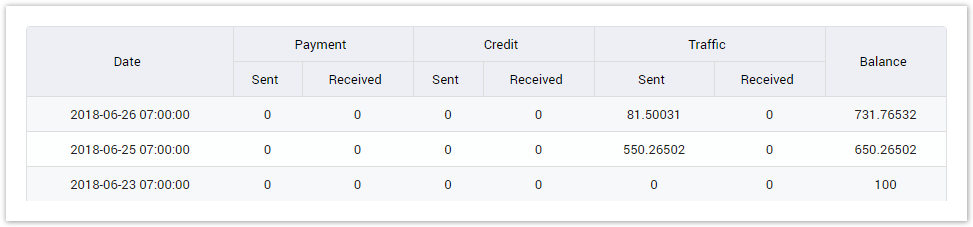
| Field Name | Description |
|---|---|
| Date | The date/time when the transaction happened. |
| Payment Sent | Total amount in Payment Sent service. |
| Payment Received | Total amount in Payment Received service. |
| Credit Sent | Total amount in Credit Sent service. |
| Credit Received | Total amount in Credit Received service. |
| Traffic Sent | Total sent amount for all services. |
| Traffic Received | Total received mount for all services. |
| Balance | The balance of carrier after the transaction happened. |
Related pages
Popular Topics
Recently Updated Pages
